¶ VM Setup
- Red Hat Enterprise Linux 9
- CPU: min 6 (4 Testing)
- MEM: min 32G (24 Testing)
- DISK:
/10 GB → 50 GB/var/log10 MB → 10 GB/var/lib/pgsql100 MB → 20 GB/var/lib/pulp1 MB → 300 GB/var/lib/qpidd~2MB per managed host
¶ Links
¶ Outside Connectivity Needs
¶ Default
¶ If using LightSpeed
- https://cert.console.redhat.com
- https://api.access.redhat.com
- https://cert-api.access.redhat.com
- https://console.redhat.com
- https://connect.cloud.redhat.com
Note:
Do not disable ipV6 on Satellite Host
¶ Install
subscription-manager register

dnf -y install firewalld sos

systemctl enable firewalld --now

firewall-cmd \
  --add-port="80/tcp" --add-port="443/tcp" \
  --add-port="5647/tcp" \
  --add-port="8000/tcp" --add-port="9090/tcp" \
  --add-port="8140/tcp" \
  #--add-port="53/udp" --add-port="53/tcp" \
  #--add-port="67/udp" \
  #--add-port="69/udp"

firewall-cmd --runtime-to-permanent

firewall-cmd --list-all
  #ports: 80/tcp 443/tcp 5647/tcp 8000/tcp 9090/tcp 8140/tcp

ping -c1 localhost
ping -c1 `hostname -f`

hostnamectl set-hostname `hostname -f`
hostnamectl

subscription-manager list --all --available --matches 'Red Hat Satellite'

subscription-manager attach --pool=xxx-listed-above-xxx
subscription-manager list --consumed

subscription-manager repos --disable "*"

subscription-manager repos \
  --enable=rhel-9-for-x86_64-baseos-rpms \
  --enable=rhel-9-for-x86_64-appstream-rpms \
  --enable=satellite-6.18-for-rhel-9-x86_64-rpms \
  --enable=satellite-maintenance-6.18-for-rhel-9-x86_64-rpms

dnf repolist enabled

dnf clean all
dnf makecache
dnf -y upgrade

yum -y install chrony
systemctl start chronyd
systemctl enable chronyd

chronyc sources

reboot

dnf install satellite

# if you need deb support
dnf search pulp | grep deb
   python3.12-pulp-deb.noarch : pulp-deb plugin for the Pulp Project
   rubygem-pulp_deb_client.noarch : Pulp 3 DEB plugin API Ruby Gem
dnf install python3.12-pulp-deb.noarch
¶ Setup Satellite
¶ Self Signed Certs
satellite-installer --scenario satellite --foreman-initial-organization "BITBULL" --foreman-initial-location "Verwaltung" --foreman-initial-admin-username admin --foreman-initial-admin-password admin --enable-foreman-cli-ansible --enable-foreman-cli --enable-foreman-cli-katello
# --skip-checks-i-know-better --tuning development
¶ Custom Cert
# combine and verify certs
cat satellite01.domain.tld_srv.pem AcmeIssuingCA2.crt AcmeRootCA2.crt > satellite01.domain.tld_chain.pem
bash openssl_check_cert_chain.sh satellite01.domain.tld_chain.pem
   0: subject=C = CH, ST = CH, L = City, O = IV, OU = IT, CN = satellite01.domain.tld
  issuer=O = Acme Corporation, CN = AcmeIssuingCA2
   1: subject=O = Acme Corporation, CN = AcmeIssuingCA2
  issuer=O = Acme Corporation, CN = AcmeRootCA2
   2: subject=O = Acme Corporation, CN = AcmeRootCA2
  issuer=O = Acme Corporation, CN = AcmeRootCA2
  satellite01.domain.tld_chain.pem: OK

# prepare katello cert
cat AcmeIssuingCA2.crt AcmeRootCA2.crt > ca_chain.pem

# verify katello cert
katello-certs-check -t foreman \
  -b ca_chain.pem \
  -c satellite01.domain.tld_srv.pem \
  -k satellite01.domain.tld_key.pem
  # Validation succeeded

# Change Cert
satellite-installer --scenario satellite --foreman-initial-organization "BITBULL" --foreman-initial-location "Verwaltung" \
  --foreman-initial-admin-username admin --foreman-initial-admin-password admin \
  --enable-foreman-cli-ansible --enable-foreman-cli --enable-foreman-cli-katello \
  --certs-server-cert /root/certificate/satellite01.domain.tld_srv.pem \
  --certs-server-key /root/certificate/satellite01.domain.tld_key.pem \
  --certs-server-ca-cert /root/certificate/ca_chain.pem \
  --certs-update-server \
  --certs-update-server-ca
¶ Foreman Content Management - Menu Overview
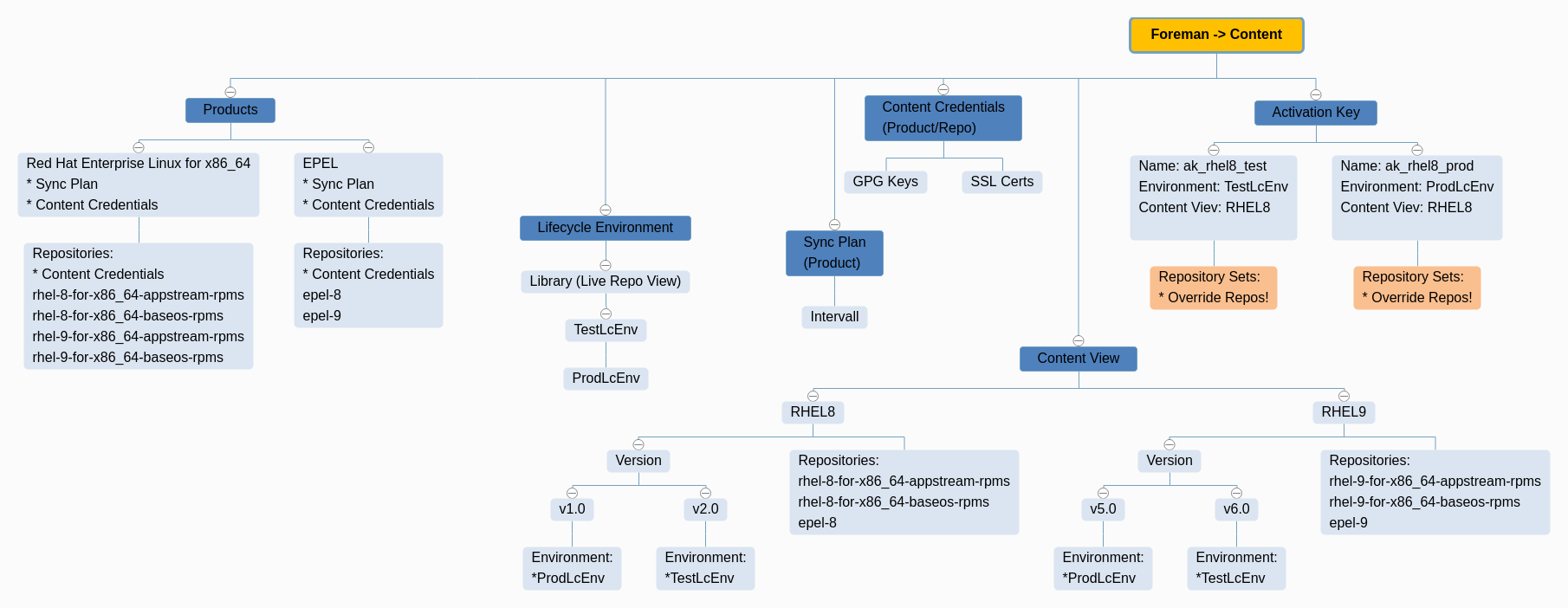
¶ Manage Repos with Foreman
¶ Create Content
-
Content > Subscriptions
Import Manifest, then allocate LICs if needed -
Content > Red Hat Repositories
Red Hat Enterprise Linux 8 for x86_64 - AppStream (RPMs)
Red Hat Enterprise Linux 8 for x86_64 - BaseOS (RPMs) -
Content > Sync Plans
Create Sync Plan > Daily -
Content > Products > [X] Red Hat Enterprise Linux for x86_64
Manage Sync Plan > Daily
Sync Selected -
Content > Lifecycle Environment > Create
TestLcEnv > ProdLcEnv -
Content > Content views > Create
- Name: cv_rhel8
- Solve dependencies: TRUE
- Add needed Repos
-
Content > Content views > cv_rhel8 > Publish new version
- Promote: TRUE
- Version: 1.0
- Env: TestLcEnv + ProdLcEnv
-
Content > Activation Keys > Create
- Name: ak_rhel8_test
- Environment: TestLcEnv
- Content View: cv_rhel8
- Repository Sets: Disable all but needed
-
Content > Activation Keys > Create
- Name: ak_rhel8_prod
- Environment: ProdLcEnv
- Content View: cv_rhel8
- Repository Sets: Disable all but needed
- Here you can "Disable Overriden" Repos, which do show up but are disabled
¶ OnBoard existing OS
¶ Deregister host
subscription-manager clean
subscription-manager remove --all
subscription-manager unregister
subscription-manager clean
¶ Register to satellite
dnf install http://satellite-fqdn.acme.com/pub/katello-ca-consumer-latest.noarch.rpm

subscription-manager register --org="BITBULL" --activationkey="ak_rhel8_prod"
# subscription-manager register --org="Your_Organization" --activationkey="Your_Activation_Key"

subscription-manager refresh
dnf repolist
cat /etc/yum.repos.d/redhat.repo
subscription-manager status

yes no | dnf upgrade
¶ Patch Cycle Ideas Brainstorming
¶ Prerequisites
- Daily Sync of all Foreman Libraries (Product upstream Repos)
- Working Repos as mentioned above
- Systems are grouped and registered in Lifecycle Environments
- TEST
- TEST-LATE
- PROD
- PROD-LATE
The meaning of "LATE" is to patch these systems later to avoid production issues (e.g., half of the systems of a Cluster (DNS, Web, ...))
¶ Patch Cycle
- All systems get patched at least every 4 weeks
- A Rundeck Job does update the Content Views on a regular base.
EXAMPLE:
----------------------------------
KW01 -> "Library" (daily sync) into "TEST" Content View as Version "KW01"
KW02 -> Version "KW01" into "TEST-LATE" Content View
KW03 -> Version "KW01" into "PROD" Content View
KW04 -> Version "KW01" into "PROD-LATE" Content View
KW05 -> "Library" (daily sync) into "TEST" Content View as Version "KW05"
KW06 -> Version "KW05" into "TEST-LATE" Content View
KW07 -> Version "KW05" into "PROD" Content View
KW08 -> Version "KW05" into "PROD-LATE" Content View
...
¶ Emergency Patching
Due to security needs, it may be necessary to apply patches immediately. For that, you have several options:
¶ Add Packages to Content View
- Create a custom Repository e.g. "Rocky9 Custom"
- Add RPMS, which are newer and needed for emergency patching to this repo
- They get applied with Ansible on a daily base during patch cycle
- Once they get obsolete (regular Repo gets updated) you can purge them out of the repo
¶ Update Content View
Easiest way to update repos but may apply more updates than needed for security reason
- Needs to pause the automated "Content View" update in Rundeck
¶ Manual Update
Manually update custom packages with yum/dnf on affected systems
- Least preferred, due to missing overview
¶ Overview
¶ Products
¶ Short Description
A Product in The Foreman is essentially a container for repositories. It helps in organizing multiple repositories under a single umbrella for easier management.
¶ Main Targets
- Organizational Structure: Group related repositories together.
- Simplified Management: Easier to manage permissions, subscriptions, and content synchronization.
¶ Example
Create a Product named RHEL7 and add repositories like RHEL7-Base, RHEL7-Updates, and RHEL7-Extras under it.
¶ Repositories
¶ Short Description
Repositories hold the actual content like RPM packages, Puppet modules, or container images. They are the most granular level of content management.
¶ Main Targets
- Content Storage: Store packages, modules, or images.
- Version Management: Keep track of different versions of content.
¶ Example
Under the RHEL7 Product, you might have repositories like:
- RHEL7-Base for basic packages
- RHEL7-Updates for updated packages
¶ Deb Repo Mirroring Example
Satellite Repos:

* Zabbix
  * Zabbix RHEL 9
    * Upstream URL: http://repo.zabbix.com/zabbix/7.2/stable/rhel/9/x86_64/
  * Zabbix Ubuntu 22.04
    * Upstream URL: https://repo.zabbix.com/zabbix/7.2/stable/ubuntu/
      * Releases/Distributions: jammy
      * Architectures: amd64
      * Components: main
  * Zabbix Ubuntu 24.04
    * Upstream URL: https://repo.zabbix.com/zabbix/7.2/stable/ubuntu/
      * Releases/Distributions: noble
      * Components: main

* Ubuntu 22.04
  * Name: jammy
    * Upstream URL: http://archive.ubuntu.com/ubuntu/
    * Releases/Distributions: jammy
      * Components: main universe multiverse restricted
      * Architectures: amd64
      * Verify SSL: Yes
  * Name: jammy-backports
    * Upstream URL: http://archive.ubuntu.com/ubuntu/
    * Releases/Distributions: jammy-backports
      * Components: main universe multiverse restricted
      * Architectures: amd64
      * Verify SSL: Yes
  * Name: jammy-security
    * Upstream URL: http://archive.ubuntu.com/ubuntu/
    * Releases/Distributions: jammy-security
      * Components: main universe multiverse restricted
      * Architectures: amd64
      * Verify SSL: Yes
  * Name: jammy-updates
    * Upstream URL: http://archive.ubuntu.com/ubuntu/
    * Releases/Distributions: jammy-updates
      * Components: main universe multiverse restricted
      * Architectures: amd64
      * Verify SSL: Yes

* ATIX subscription-manager
  * Name: ATIX subscription-manager 22.04
    * Upstream URL: https://apt.atix.de/Ubuntu22LTS/
    * Releases/Distributions: stable
    * Components: main
    * Verify SSL: Yes
      * GPG Key: "Fetch from repo"
¶ Lifecycle Environments
¶ Short Description
Lifecycle Environments represent stages in your deployment pipeline, such as Development, Testing, and Production.
¶ Main Targets
- Workflow Management: Control the flow of content through various stages.
- Quality Assurance: Test content in isolated environments before production deployment.
¶ Example
A typical flow might be: LcDev → LcTest → LcQA → LcProd.
- Content first gets uploaded to LcDev for initial testing.
- If it passes, it moves to LcTest for more rigorous checks.
- After that, it goes to LcQA for quality assurance.
- Finally, it gets promoted to LcProd for production use.
¶ Content Views
¶ Short Description
A Content View is a snapshot of multiple repositories and/or Puppet modules. It allows you to filter and combine content from various repositories.
¶ Main Targets
- Content Isolation: Create customized views of content for different hosts or host groups.
- Versioning: Snapshot content for reliable deployments.
¶ Example
Create a Content View named WebServers that includes packages from RHEL7-Base and RHEL7-Updates but excludes certain debugging packages.
¶ Activation Keys
¶ Short Description
Activation Keys are tokens used during the host registration process. They define which Content View and Lifecycle Environment a host should be associated with, and can also control repository subscriptions.
¶ Main Targets
- Automated Registration: Simplify the process of registering new hosts.
- Configuration Management: Automatically apply the correct repositories and lifecycle environments to hosts.
- Repository Override: Control which repositories are visible but not enabled, allowing clients to optionally subscribe to them.
¶ Example
Create an Activation Key named ProdServers that is tied to the WebServers Content View and the LcProd Lifecycle Environment. Use this key when registering production servers.
¶ Repository Override
Within the Activation Key settings, you can specify that certain repositories, like Epel, are visible but not automatically enabled. This means that while the repository will be available to the client, it won't be enabled by default. The client can then choose to manually subscribe to this repository if needed.
For example, you could have an Activation Key for development servers where the Epel repository is visible but not enabled. Developers can then decide whether or not to enable this repository on their individual servers.